


In trail racing, fitness is only part of the equation. You can be fully prepared and still fall apart on race day when execution slips — going out too fast, missing a turn, fueling too late, or spending too long at an aid station. Small decisions, repeated over hours, define your race.
That's what makes trail racing unique. Performance depends on how well you manage effort, terrain, and decisions from start to finish — as much as it depends on your fitness.
The objective on race day is simple: reduce uncertainty, and limit the number of decisions you need to make under fatigue. Here's how to use COROS tools to prepare and execute your race more effectively.
1. Build Your Race Plan Before the Start
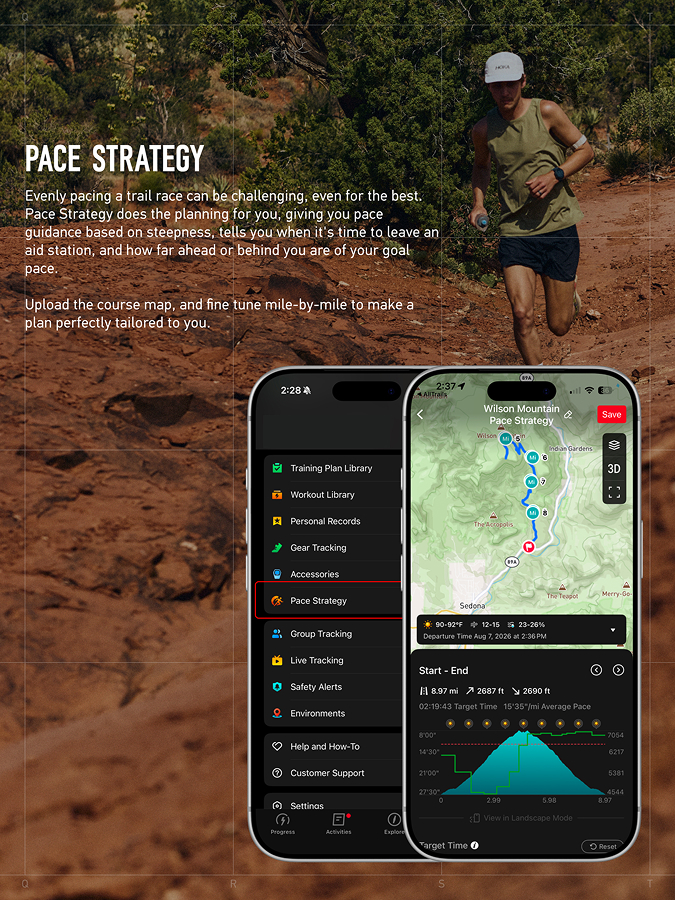
Race execution starts well before the gun goes off, and it happens in two connected steps: understand the course, then build a pacing plan around it.
Importing the official GPX route into the COROS app's Explore Page moves you from "seeing the course" to understanding it. From there, you can:
- Explore the route in 2D and 3D map views, with a satellite layer option
- Preview the full elevation profile and identify the long climbs, the runnable sections, and where fatigue is likely to build
- Add waypoints for each aid station and other strategic points along the route
That course data feeds directly into your pacing plan. Pace Strategy combines your fitness data with the route's elevation profile to assign a target pace to each segment — controlled on the climbs, efficient on the runnable ground. Before the start, you can:
- Use COROS's predicted finish time based on your fitness data, or set your own target
- See how effort should be distributed across every segment of the course
- Get a projected arrival time at each waypoint and aid station
- Decide in advance how long you'll allow yourself at each stop
You arrive at the start line with a pacing plan built from the actual course you're about to run. That plan becomes your reference when race-day adrenaline starts to interfere.
Click here to read more about how Pace Strategy was built with input from Kilian Jornet.
2. Follow the Right Signals on Race Day
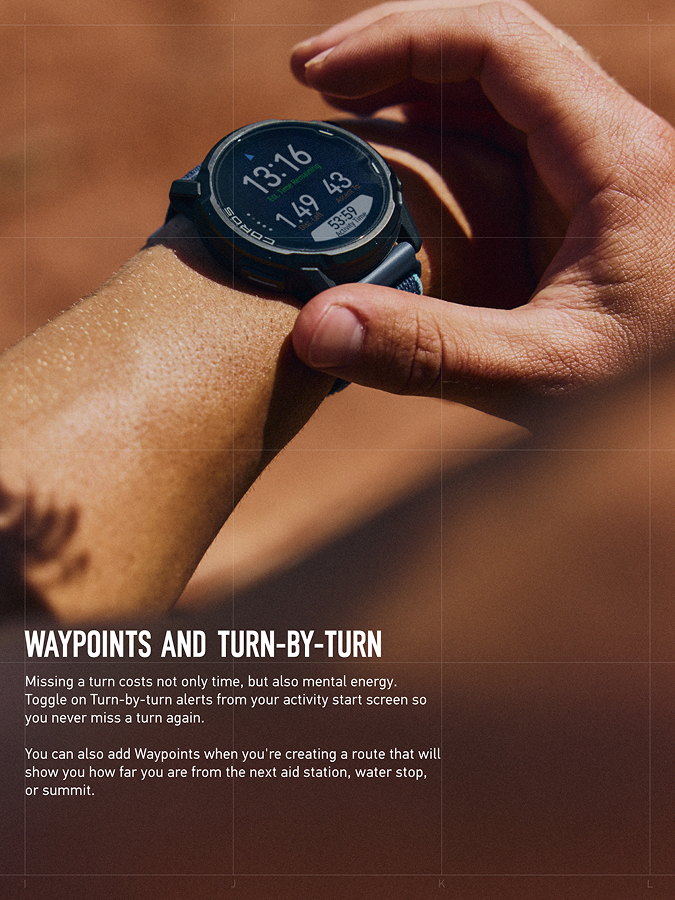
Once the race starts, everything gets harder. Fatigue builds, focus narrows, and small mistakes become more likely. That's exactly when your watch should give you clear, well-timed signals to act on.
With Turn by Turn navigation and waypoint tracking, you get clear, actionable information:
- Turn-by-turn directions at key junctions
- A Deviate Alert if you go off course
- Distance and elevation remaining to the next aid station
You react to a clear signal exactly when it matters. This becomes especially valuable late in the race, when attention is limited and mistakes are most costly. You stay on track, physically and mentally.
3. Automate Key Decisions with Alerts
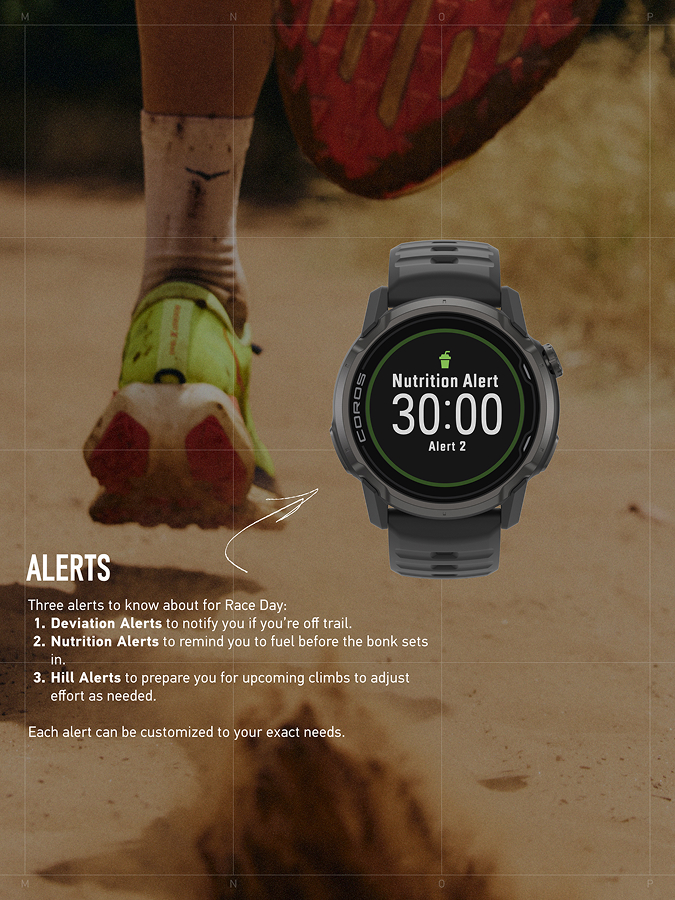
As the race progresses, your ability to make good decisions decreases — that's a normal part of endurance racing. The goal is to automate what you can, so your watch handles the decisions fatigue tends to erode.
COROS alerts handle three of those decisions:
- Nutrition Alerts remind you to fuel before it's too late
- Hill Alerts flag upcoming climbs so you can adjust your effort early
- Activity Alerts for pace, heart rate, and cadence notify you the moment you drift outside the range you set before the race
Your watch remembers when to eat, anticipates the climbs, tracks your direction, and flags it the moment your effort drifts off plan, so you can stay focused on moving forward.
4. Let Your Crew Follow Along with Live Tracking
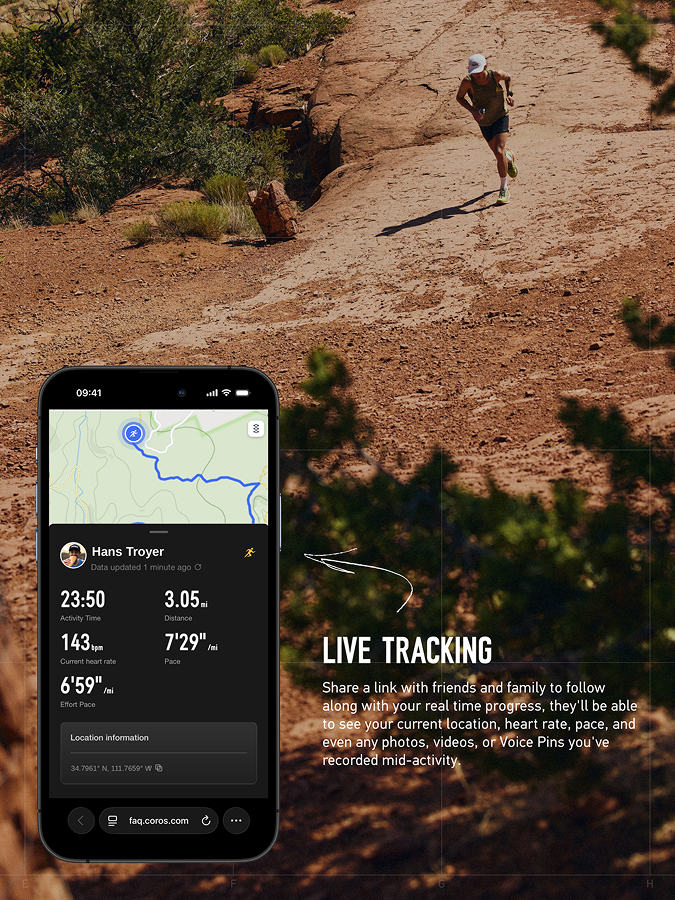
Crew, family, and friends waiting at aid stations are part of the race too. They need some sense of when to expect you, and a long day on unpredictable terrain makes that timing hard to guess.
Live Tracking shares your real-time location, pace, heart rate, and elevation gain through a link you send out before the race, so the people supporting you can follow your progress in real time. You can:
- Schedule a shareable link in advance, tied to your saved route and start time, or generate one on demand during the activity
- Let your crew follow your live GPS position, along with any photos, voice notes, or pins you send from the watch
- Give them visibility into pauses and Safety Alerts, so they know something's off before you have to explain it
Note: Live Tracking increases GPS and bluetooth connection use, which accelerates battery drain on both your watch and the paired phone. If watch battery is already tight for the distance you're racing, weigh that against how much visibility your crew actually needs.
5. Simplify What You See
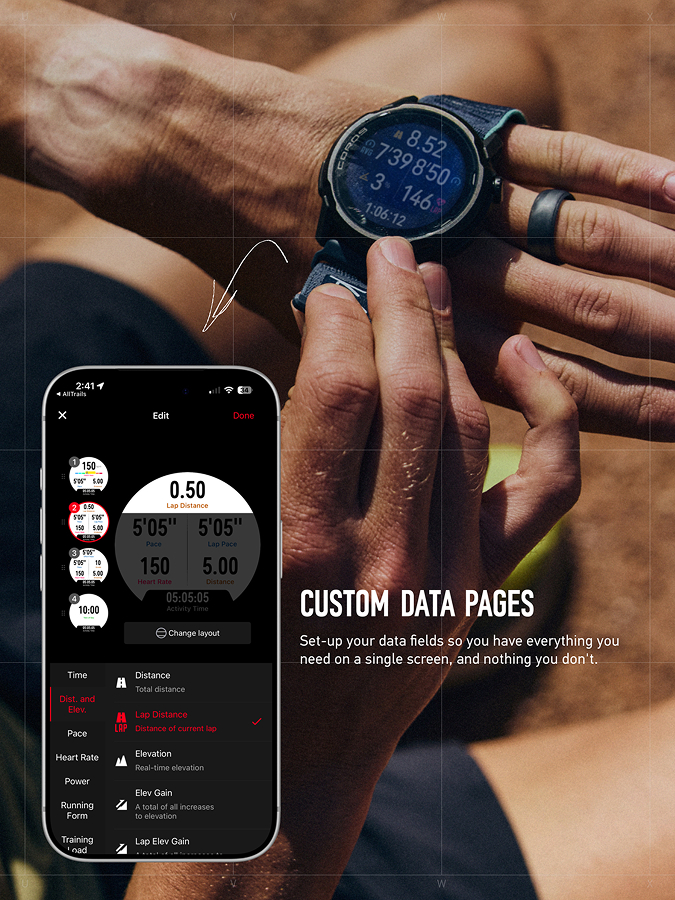
On race day, clarity of your data is crucial. The more fatigued you get, the harder it becomes to process information. Too many metrics quickly turn into noise, especially on technical terrain or late in the race when your focus is already stretched.
With Custom Data Pages, you decide what truly matters. You can build screens that match how you race:
- Display only the key metrics relevant to your strategy
- Reduce the need to scroll between pages
- Access the right information instantly, when you need it
Instead of adapting to your watch's presets, your watch adapts to your preferences.
From Preparation to Execution
By the time race day arrives, your fitness is already built. Race day is where you put it to work.
What makes the difference is how well you manage your effort, your fueling, your decisions, and your focus. COROS tools reduce the number of decisions you have to make when it matters most, so you can stay consistent from start to finish.
Because in trail racing, performance comes down to executing better, for longer.
/filters:quality(90)/fit-in/576x432/coros-web-faq/upload/images/cb4b8029660689fcc6139aebe6c84ea8.png)
/filters:quality(90)/fit-in/576x432/coros-web-faq/upload/images/18be38602a3340ffa37618a31487b4f6.png)
/filters:quality(90)/fit-in/576x432/coros-web-faq/upload/images/f9c6e76e4c54d6baf1f685d46566d468.jpg)
/filters:quality(90)/fit-in/576x432/coros-web-faq/upload/images/16a25e1ec7d05f835514bf698d0b748e.png)
/filters:quality(90)/fit-in/576x432/coros-web-faq/upload/images/2ee1df37c9387ebe5008a8119496107b.png)
/filters:quality(90)/fit-in/576x432/coros-web-faq/upload/images/348f1825c344e4928c570cbc259b3dd7.png)
/filters:quality(90)/fit-in/576x432/coros-web-faq/upload/images/addf866310cfbd7f11561fda1457598e.jpg)
/filters:quality(90)/fit-in/576x432/coros-web-faq/upload/images/710f182f401b9898650d56033989fd66.png)
/filters:quality(90)/fit-in/576x432/coros-web-faq/upload/images/e83d9b6e2f7e88a73f5aaa1f3d247dbe.jpg)
/filters:quality(90)/fit-in/576x432/coros-web-faq/upload/images/acd0e017cf56197759302113b68adfb5.png)