


Anglers of all skill levels have thought about or tried keeping a fishing journal, but most never stick with it.
Still, knowing the exact variables that impact your day on the water is crucial. Understanding how barometric pressure, wind, and temperature affect the bite, and knowing your peak activity windows so you can compare them is essential if you want to dial in your seasonal patterns and catch more fish.
Here is how to drop a Voice Pin, examples of the data you can track, and how to access it at any moment.
How to Record
Logging data shouldn’t feel like a chore, and it definitely shouldn’t change the way you fish. That’s why COROS built this dedicated feature into its fishing activity mode.
With a single click, you can log key information using the microphone on your COROS NOMAD watch. It's even easier and more detailed than using your favorite fish finder.
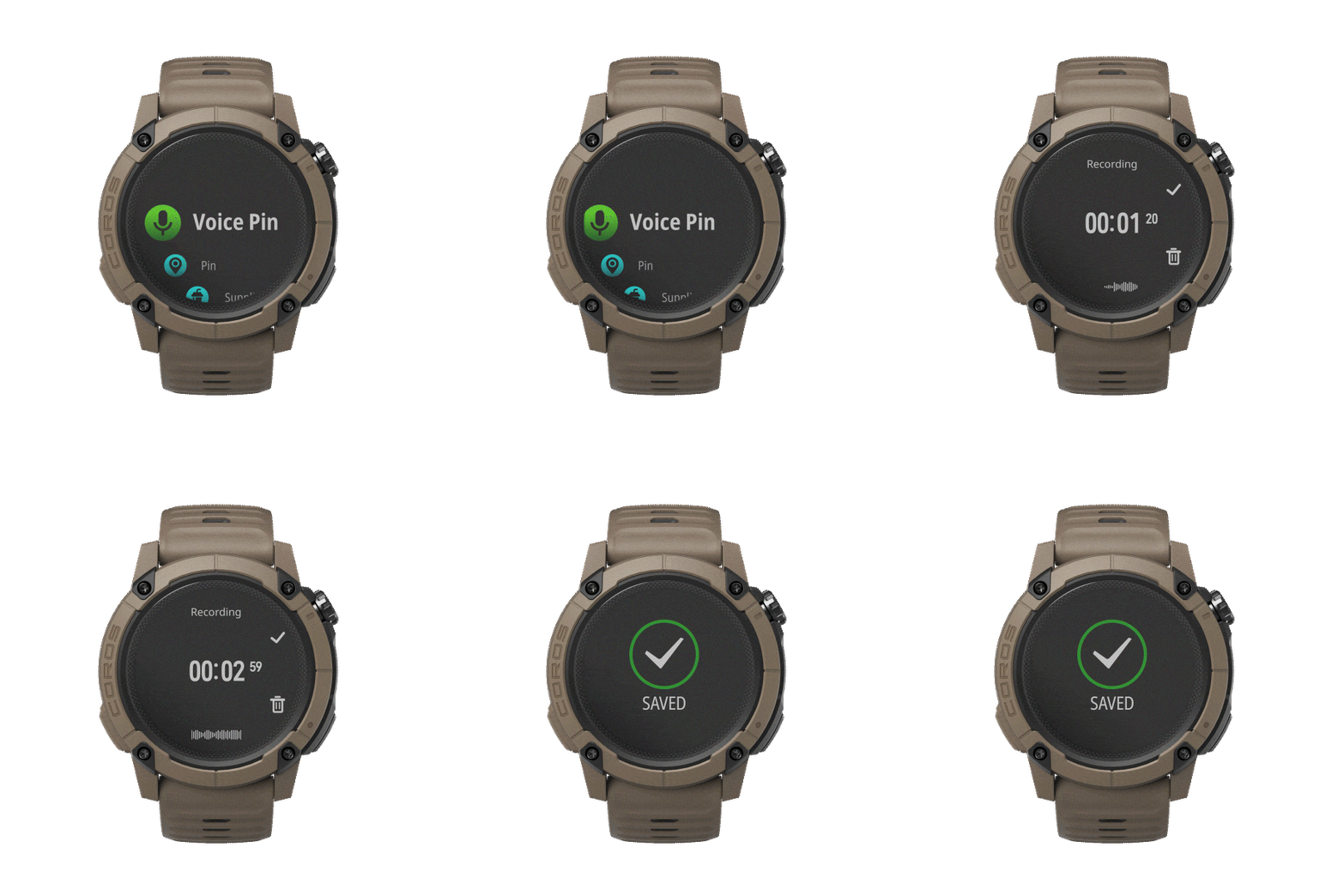
Once you’re in the fishing activity mode (assuming the digital dial is in the top right), simply click the bottom right button and select "Voice Pin."
From there, it couldn't be simpler: just talk to your watch to log your data. For example: "4-pound bass caught on a spinnerbait next to a brush pile."
The built-in voice recognition will automatically transcribe your words into text and drop a corresponding waypoint. In this case, it will create a "Catch" waypoint, auto-populating the species as "Black Bass" and the weight as "4 pounds." It also saves your original audio file right to the waypoint, so you can listen back whenever you want.
Data You Can Track
Logging this data allows you to break down your day and figure out exactly why you crushed it, or why you struggled. The more detailed you are, the better your post-trip analysis will be. Here are some examples of what you can log:
- Catches: Species and size/weight (e.g., "4-pound bass")
- Tackle: Rod, reel, and line setup (e.g., "Medium rod with an 8.6 ratio reel and 20-pound braid")
- Technique: Chatterbait, topwater, spinnerbait, etc.
- Lures: Weight, color, and brand (e.g., "1/4oz Caperlan white spinnerbait with a black Yamamoto Zako trailer")
- Pattern Details:"I had to burn it back to trigger a reaction bite."
- Example of a complete Voice Pin:"4-pound bass on a 1/4oz Caperlan spinnerbait with a black Yamamoto Zako trailer, using a medium-heavy setup, burning it back fast."
How to Review and Analyze Your Fishing Journal
To review and analyze your Voice Pins, just open your fishing activity summary or check the Explore Map in the app. Click on any waypoint to view your data.
If needed, you can add or edit details in your notes, and even attach photos of your catch, the lure, or the spot.
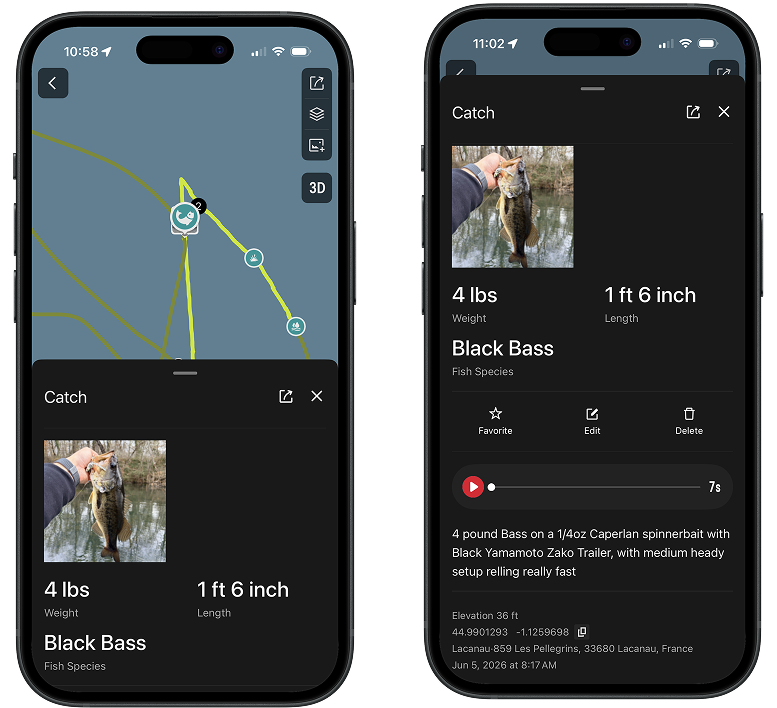
Connecting this information with the stats already built into your fishing activity reports like weather data, barometric pressure, wind, and best time slots, will help you unlock those subtle details that will help you fish better for the next session.
/filters:quality(90)/fit-in/576x432/coros-web-faq/upload/images/48fb7ccbc83e54c9db5321dcedb0899c.png)
/filters:quality(90)/fit-in/576x432/coros-web-faq/upload/images/e4fb829cf32cb62b0cc237e0140dd947.jpeg)
/filters:quality(90)/fit-in/576x432/coros-web-faq/upload/images/4b99e1b7bb44a57717c2c42a95036aa9.jpeg)
/filters:quality(90)/fit-in/576x432/coros-web-faq/upload/images/eb73e573cae8087a129044908aea27ad.jpeg)
/filters:quality(90)/fit-in/576x432/coros-web-faq/upload/images/f74d92ae7e0e6f890e0d1bec4dd43612.jpg)
/filters:quality(90)/fit-in/576x432/coros-web-faq/upload/images/4d1b547d4fb77854691358993f8ed4b0.jpg)
/filters:quality(90)/fit-in/576x432/coros-web-faq/upload/images/465c5d4b5b6916d84f3d5458e1a2f70b.png)
/filters:quality(90)/fit-in/576x432/coros-web-faq/upload/images/7de67402923e4ae75520b0daf6304b9a.png)
/filters:quality(90)/fit-in/576x432/coros-web-faq/upload/images/0118316e571721c465139dee07a61c64.jpg)